> ## Documentation Index
> Fetch the complete documentation index at: https://docs-staging-feat-docs-5612-expanded-grant-support-ea.mintlify.site/llms.txt
> Use this file to discover all available pages before exploring further.

> Learn how to configure an update policy form using Forms for Actions for users to review and accept new terms of service or consent updates.

# Use Cases: Configure an update policy form using Forms

<Card title="Before you start">
  1. Create a [Machine-to-Machine Application](/docs/get-started/auth0-overview/create-applications/machine-to-machine-apps) with the following scopes enabled:

  * `read:users`
  * `update:users`
  * `create:users`
  * `read:users_app_metadata`
  * `update:users_app_metadata`
  * `create:users_app_metadata`

  2. Add a [Vault connection](/docs/customize/forms/vault) using the M2M application credentials.
</Card>

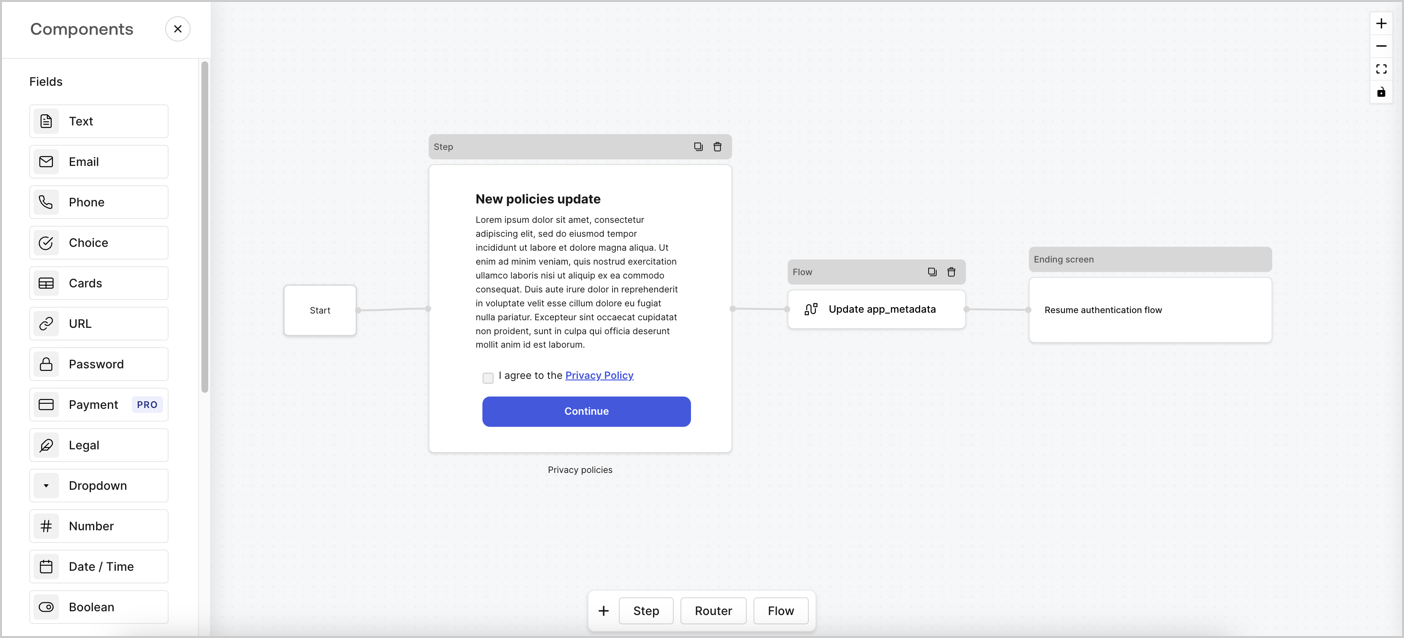
Forms for Actions allows you to create custom privacy policies flows and store the consent under the `app_metadata` object.
<Frame>
  <img src="https://mintcdn.com/docs-staging-feat-docs-5612-expanded-grant-support-ea/9hfF-AyYi6DR5vLX/docs/images/cdy7uua7fh8z/6i68dMvHDTijfRmSgN1x8Q/ad900e7d4c0fb34645921435472b8684/privavy-policy-form.png?fit=max&auto=format&n=9hfF-AyYi6DR5vLX&q=85&s=2df4747056be904421c942d15a5db0fc" alt="Dashboard > Actions > Forms > Privacy policy use case" data-og-width="1404" width="1404" data-og-height="638" height="638" data-path="docs/images/cdy7uua7fh8z/6i68dMvHDTijfRmSgN1x8Q/ad900e7d4c0fb34645921435472b8684/privavy-policy-form.png" data-optimize="true" data-opv="3" srcset="https://mintcdn.com/docs-staging-feat-docs-5612-expanded-grant-support-ea/9hfF-AyYi6DR5vLX/docs/images/cdy7uua7fh8z/6i68dMvHDTijfRmSgN1x8Q/ad900e7d4c0fb34645921435472b8684/privavy-policy-form.png?w=280&fit=max&auto=format&n=9hfF-AyYi6DR5vLX&q=85&s=13b6801e1a2e8780913cc99be1b6331a 280w, https://mintcdn.com/docs-staging-feat-docs-5612-expanded-grant-support-ea/9hfF-AyYi6DR5vLX/docs/images/cdy7uua7fh8z/6i68dMvHDTijfRmSgN1x8Q/ad900e7d4c0fb34645921435472b8684/privavy-policy-form.png?w=560&fit=max&auto=format&n=9hfF-AyYi6DR5vLX&q=85&s=1e19d8f87c157ffa6f529bc9a99990f4 560w, https://mintcdn.com/docs-staging-feat-docs-5612-expanded-grant-support-ea/9hfF-AyYi6DR5vLX/docs/images/cdy7uua7fh8z/6i68dMvHDTijfRmSgN1x8Q/ad900e7d4c0fb34645921435472b8684/privavy-policy-form.png?w=840&fit=max&auto=format&n=9hfF-AyYi6DR5vLX&q=85&s=376fe429fe2f3a4bdb2a1cb8463c4ef8 840w, https://mintcdn.com/docs-staging-feat-docs-5612-expanded-grant-support-ea/9hfF-AyYi6DR5vLX/docs/images/cdy7uua7fh8z/6i68dMvHDTijfRmSgN1x8Q/ad900e7d4c0fb34645921435472b8684/privavy-policy-form.png?w=1100&fit=max&auto=format&n=9hfF-AyYi6DR5vLX&q=85&s=1419136272259f9658c72689b51d571d 1100w, https://mintcdn.com/docs-staging-feat-docs-5612-expanded-grant-support-ea/9hfF-AyYi6DR5vLX/docs/images/cdy7uua7fh8z/6i68dMvHDTijfRmSgN1x8Q/ad900e7d4c0fb34645921435472b8684/privavy-policy-form.png?w=1650&fit=max&auto=format&n=9hfF-AyYi6DR5vLX&q=85&s=bd01bfffff2104a32783e2c736e1d62d 1650w, https://mintcdn.com/docs-staging-feat-docs-5612-expanded-grant-support-ea/9hfF-AyYi6DR5vLX/docs/images/cdy7uua7fh8z/6i68dMvHDTijfRmSgN1x8Q/ad900e7d4c0fb34645921435472b8684/privavy-policy-form.png?w=2500&fit=max&auto=format&n=9hfF-AyYi6DR5vLX&q=85&s=9a88160f8d6b706aed268a2f41660044 2500w" />
</Frame>

The sections below outline how you can create an Update Policy form using nodes and flows, along with steps for adding your form to a [Post Login](/docs/customize/actions/explore-triggers/signup-and-login-triggers/login-trigger) Action.

## Create a form from scratch

Follow these steps to create a form to gather information:

1. Open the Form editor by selecting **Auth0 Dashboard > Actions > Forms.**
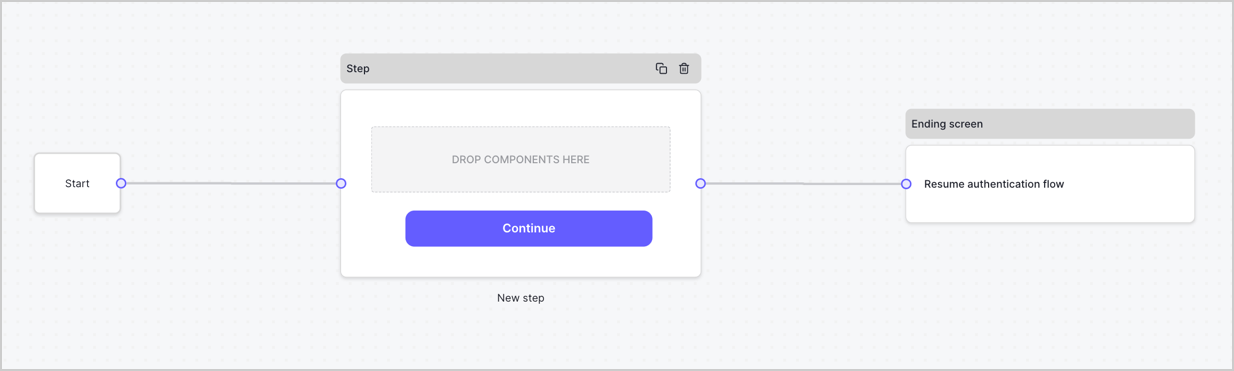
2. Select **Create Form** > **Start from scratch**.

By default, a new form contains a Start node, a Step node, and an Ending screen node.
<Frame>
  <img src="https://mintcdn.com/docs-staging-feat-docs-5612-expanded-grant-support-ea/fOyWaRq4jbbrpajC/docs/images/cdy7uua7fh8z/2TZ9jSjgEcARFpULI6hz4R/a4319a1bd482f2ee5cc23100fdb2f42c/New-form-Forms-for-action-use-case.png?fit=max&auto=format&n=fOyWaRq4jbbrpajC&q=85&s=455cfcabcf8586e80d076488bef06d59" alt="Dashboard > Forms > Use Cases > Form" data-og-width="1234" width="1234" data-og-height="371" height="371" data-path="docs/images/cdy7uua7fh8z/2TZ9jSjgEcARFpULI6hz4R/a4319a1bd482f2ee5cc23100fdb2f42c/New-form-Forms-for-action-use-case.png" data-optimize="true" data-opv="3" srcset="https://mintcdn.com/docs-staging-feat-docs-5612-expanded-grant-support-ea/fOyWaRq4jbbrpajC/docs/images/cdy7uua7fh8z/2TZ9jSjgEcARFpULI6hz4R/a4319a1bd482f2ee5cc23100fdb2f42c/New-form-Forms-for-action-use-case.png?w=280&fit=max&auto=format&n=fOyWaRq4jbbrpajC&q=85&s=da94aabe8d3a9503fc698705e6e31c48 280w, https://mintcdn.com/docs-staging-feat-docs-5612-expanded-grant-support-ea/fOyWaRq4jbbrpajC/docs/images/cdy7uua7fh8z/2TZ9jSjgEcARFpULI6hz4R/a4319a1bd482f2ee5cc23100fdb2f42c/New-form-Forms-for-action-use-case.png?w=560&fit=max&auto=format&n=fOyWaRq4jbbrpajC&q=85&s=fb8fe89290353923a1a4bf8995f1c586 560w, https://mintcdn.com/docs-staging-feat-docs-5612-expanded-grant-support-ea/fOyWaRq4jbbrpajC/docs/images/cdy7uua7fh8z/2TZ9jSjgEcARFpULI6hz4R/a4319a1bd482f2ee5cc23100fdb2f42c/New-form-Forms-for-action-use-case.png?w=840&fit=max&auto=format&n=fOyWaRq4jbbrpajC&q=85&s=da65393e2d99557168c0ab3b692c4316 840w, https://mintcdn.com/docs-staging-feat-docs-5612-expanded-grant-support-ea/fOyWaRq4jbbrpajC/docs/images/cdy7uua7fh8z/2TZ9jSjgEcARFpULI6hz4R/a4319a1bd482f2ee5cc23100fdb2f42c/New-form-Forms-for-action-use-case.png?w=1100&fit=max&auto=format&n=fOyWaRq4jbbrpajC&q=85&s=92464843c6420ffb2f769cd4a711a4f7 1100w, https://mintcdn.com/docs-staging-feat-docs-5612-expanded-grant-support-ea/fOyWaRq4jbbrpajC/docs/images/cdy7uua7fh8z/2TZ9jSjgEcARFpULI6hz4R/a4319a1bd482f2ee5cc23100fdb2f42c/New-form-Forms-for-action-use-case.png?w=1650&fit=max&auto=format&n=fOyWaRq4jbbrpajC&q=85&s=ca04cd6502a9707c40929eb587ab8d42 1650w, https://mintcdn.com/docs-staging-feat-docs-5612-expanded-grant-support-ea/fOyWaRq4jbbrpajC/docs/images/cdy7uua7fh8z/2TZ9jSjgEcARFpULI6hz4R/a4319a1bd482f2ee5cc23100fdb2f42c/New-form-Forms-for-action-use-case.png?w=2500&fit=max&auto=format&n=fOyWaRq4jbbrpajC&q=85&s=f1e850d226822e8bf21444a79110f4e8 2500w" />
</Frame>

### Configure the Step node

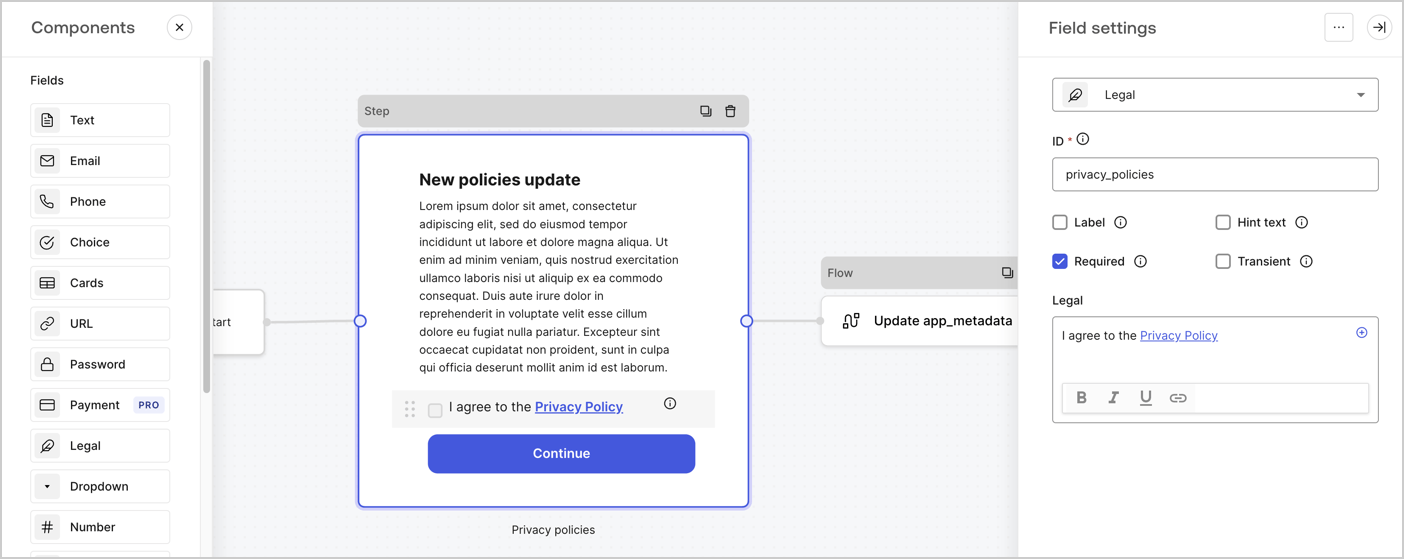
The Step node is the graphical interface visible to users. Add [Fields](/docs/customize/forms/nodes-and-components) to the Step node to collect the new agreement acceptance value by following these steps:

1. Drag a **Rich text** field from the **Components menu** into the **Step** node.

   * **Rich text**: Enter a description of your privacy policies updates.
   * Select **Save**.
2. Drag a **Legal** field into the **Step** node.

   * **ID**: Enter `privacy_policies`.
   * **Required**: Enable the checkbox.
   * **Legal**: Enter `I agree to the Privacy Policy`.
   * Select **Save**.
3. Select **Publish** to save.
<Frame>
  <img src="https://mintcdn.com/docs-staging-feat-docs-5612-expanded-grant-support-ea/LIbMoziEn8oPV0Vi/docs/images/cdy7uua7fh8z/59zFFjQjAnjogkc2QGIqqJ/0ad66b1b636544122aa4e65968b76c2c/privacy-policy-step-node.png?fit=max&auto=format&n=LIbMoziEn8oPV0Vi&q=85&s=7aecf0d79fb10884f471d1cb5d70f684" alt="Dashboard > Actions > Forms > Use case privacy policy step node" data-og-width="1404" width="1404" data-og-height="559" height="559" data-path="docs/images/cdy7uua7fh8z/59zFFjQjAnjogkc2QGIqqJ/0ad66b1b636544122aa4e65968b76c2c/privacy-policy-step-node.png" data-optimize="true" data-opv="3" srcset="https://mintcdn.com/docs-staging-feat-docs-5612-expanded-grant-support-ea/LIbMoziEn8oPV0Vi/docs/images/cdy7uua7fh8z/59zFFjQjAnjogkc2QGIqqJ/0ad66b1b636544122aa4e65968b76c2c/privacy-policy-step-node.png?w=280&fit=max&auto=format&n=LIbMoziEn8oPV0Vi&q=85&s=a54ca8ca29b8b3414d8d5506443bf2ca 280w, https://mintcdn.com/docs-staging-feat-docs-5612-expanded-grant-support-ea/LIbMoziEn8oPV0Vi/docs/images/cdy7uua7fh8z/59zFFjQjAnjogkc2QGIqqJ/0ad66b1b636544122aa4e65968b76c2c/privacy-policy-step-node.png?w=560&fit=max&auto=format&n=LIbMoziEn8oPV0Vi&q=85&s=21339aaab21451437e8b34ef7494e161 560w, https://mintcdn.com/docs-staging-feat-docs-5612-expanded-grant-support-ea/LIbMoziEn8oPV0Vi/docs/images/cdy7uua7fh8z/59zFFjQjAnjogkc2QGIqqJ/0ad66b1b636544122aa4e65968b76c2c/privacy-policy-step-node.png?w=840&fit=max&auto=format&n=LIbMoziEn8oPV0Vi&q=85&s=4dbe4505d1b77711197171a12e2914c6 840w, https://mintcdn.com/docs-staging-feat-docs-5612-expanded-grant-support-ea/LIbMoziEn8oPV0Vi/docs/images/cdy7uua7fh8z/59zFFjQjAnjogkc2QGIqqJ/0ad66b1b636544122aa4e65968b76c2c/privacy-policy-step-node.png?w=1100&fit=max&auto=format&n=LIbMoziEn8oPV0Vi&q=85&s=7aa6368b6e92b2800e8a9ed95ae7fc38 1100w, https://mintcdn.com/docs-staging-feat-docs-5612-expanded-grant-support-ea/LIbMoziEn8oPV0Vi/docs/images/cdy7uua7fh8z/59zFFjQjAnjogkc2QGIqqJ/0ad66b1b636544122aa4e65968b76c2c/privacy-policy-step-node.png?w=1650&fit=max&auto=format&n=LIbMoziEn8oPV0Vi&q=85&s=f5ad67bb6899dbb6e50fcd273e1b0369 1650w, https://mintcdn.com/docs-staging-feat-docs-5612-expanded-grant-support-ea/LIbMoziEn8oPV0Vi/docs/images/cdy7uua7fh8z/59zFFjQjAnjogkc2QGIqqJ/0ad66b1b636544122aa4e65968b76c2c/privacy-policy-step-node.png?w=2500&fit=max&auto=format&n=LIbMoziEn8oPV0Vi&q=85&s=8d9c419eec1f5ce36c0e79c3a2f3d6c4 2500w" />
</Frame>

### Configure the Flow node

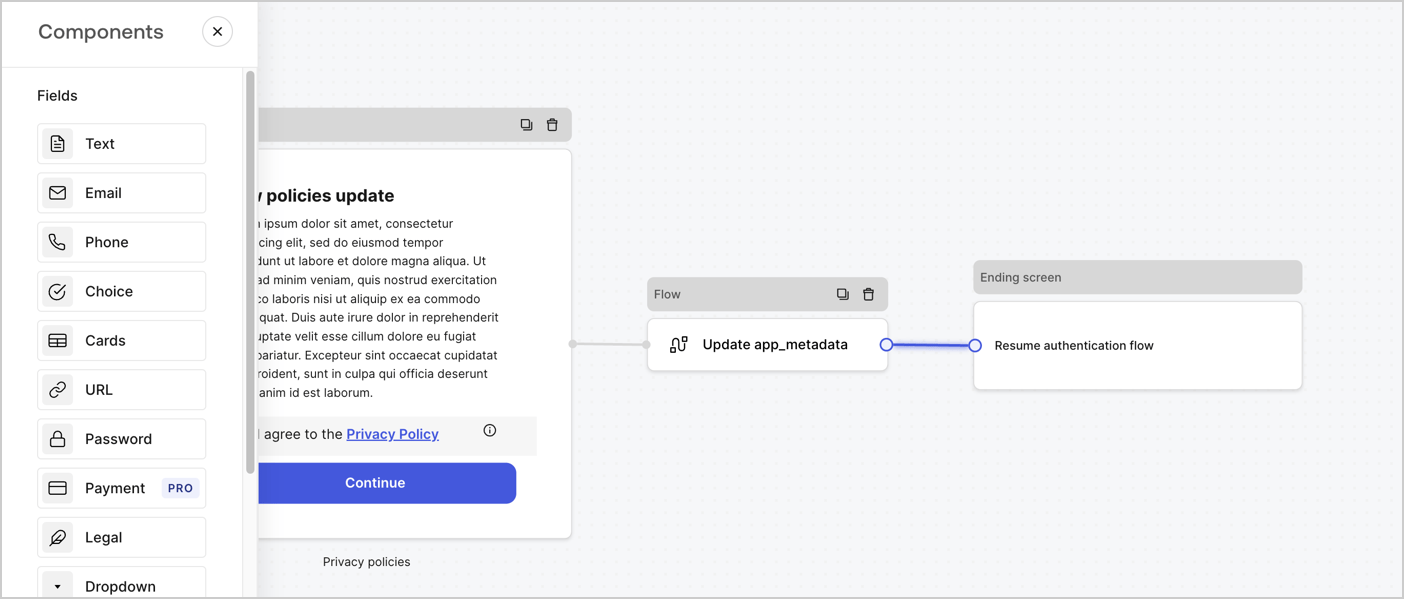
Add a **Flow** node after the **Step** node to update the `app_metadata` and resume the authentication flow by following these steps:

1. Select **Flow** from the bottom of the Form editor.
2. Remove the existing link between the **Step** and **Ending Screen** nodes.
3. Select the new **Flow** > **Click to add a flow** > **Create a new flow.**

   * Enter `Update app_metadata` in the **Name** field.
   * Select **Create**.
   * Select **Save**.
4. Link the **Flow** node to the **Step** and **Ending Screen** nodes as pictured below.
5. Select **Publish** to save.
<Frame>
  <img src="https://mintcdn.com/docs-staging-feat-docs-5612-expanded-grant-support-ea/9hfF-AyYi6DR5vLX/docs/images/cdy7uua7fh8z/6YIkzm7SrpM9LW76AXuRzh/353c518fe82bbaa440836da1d83596d6/link-policies.png?fit=max&auto=format&n=9hfF-AyYi6DR5vLX&q=85&s=476bc2808901787832b5ac87a50219f4" alt="Dashboard > Actions > Forms > Form" data-og-width="1404" width="1404" data-og-height="599" height="599" data-path="docs/images/cdy7uua7fh8z/6YIkzm7SrpM9LW76AXuRzh/353c518fe82bbaa440836da1d83596d6/link-policies.png" data-optimize="true" data-opv="3" srcset="https://mintcdn.com/docs-staging-feat-docs-5612-expanded-grant-support-ea/9hfF-AyYi6DR5vLX/docs/images/cdy7uua7fh8z/6YIkzm7SrpM9LW76AXuRzh/353c518fe82bbaa440836da1d83596d6/link-policies.png?w=280&fit=max&auto=format&n=9hfF-AyYi6DR5vLX&q=85&s=6401ab366b323c755dfb7dbee0e9499d 280w, https://mintcdn.com/docs-staging-feat-docs-5612-expanded-grant-support-ea/9hfF-AyYi6DR5vLX/docs/images/cdy7uua7fh8z/6YIkzm7SrpM9LW76AXuRzh/353c518fe82bbaa440836da1d83596d6/link-policies.png?w=560&fit=max&auto=format&n=9hfF-AyYi6DR5vLX&q=85&s=3052ce6dbb0688e6c2a4a0ed57eaa4c7 560w, https://mintcdn.com/docs-staging-feat-docs-5612-expanded-grant-support-ea/9hfF-AyYi6DR5vLX/docs/images/cdy7uua7fh8z/6YIkzm7SrpM9LW76AXuRzh/353c518fe82bbaa440836da1d83596d6/link-policies.png?w=840&fit=max&auto=format&n=9hfF-AyYi6DR5vLX&q=85&s=c0f2e096942af6577d5f4db6539964f1 840w, https://mintcdn.com/docs-staging-feat-docs-5612-expanded-grant-support-ea/9hfF-AyYi6DR5vLX/docs/images/cdy7uua7fh8z/6YIkzm7SrpM9LW76AXuRzh/353c518fe82bbaa440836da1d83596d6/link-policies.png?w=1100&fit=max&auto=format&n=9hfF-AyYi6DR5vLX&q=85&s=d0239abe201a7e00268c5d8fdf55178b 1100w, https://mintcdn.com/docs-staging-feat-docs-5612-expanded-grant-support-ea/9hfF-AyYi6DR5vLX/docs/images/cdy7uua7fh8z/6YIkzm7SrpM9LW76AXuRzh/353c518fe82bbaa440836da1d83596d6/link-policies.png?w=1650&fit=max&auto=format&n=9hfF-AyYi6DR5vLX&q=85&s=17c07dfde44b09cbf307e2e6ed5e1ea3 1650w, https://mintcdn.com/docs-staging-feat-docs-5612-expanded-grant-support-ea/9hfF-AyYi6DR5vLX/docs/images/cdy7uua7fh8z/6YIkzm7SrpM9LW76AXuRzh/353c518fe82bbaa440836da1d83596d6/link-policies.png?w=2500&fit=max&auto=format&n=9hfF-AyYi6DR5vLX&q=85&s=528157da26188deef89958736d4a5d74 2500w" />
</Frame>

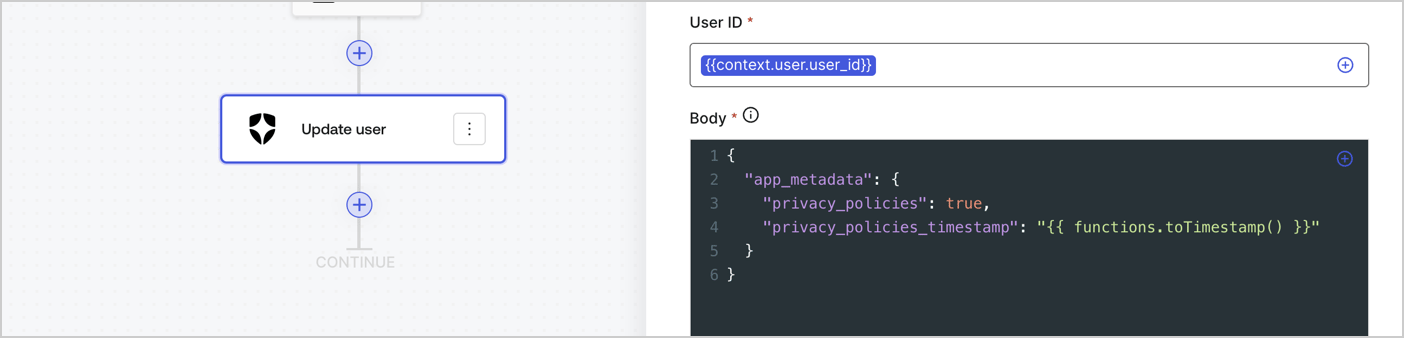
Add an Auth0 Update user action to the flow by following these steps:

1. Select the **Flow** **Update app\_metadata** > **Edit flow** to open the Flow editor in a new tab.
2. Below the StartAction, select the **+** icon to add an **Update user** action. Complete the fields below, then select **Save** to continue.

   * **Connection**: Select from the dropdown the Vault connection to your M2M application.

   * **User ID**: Enter `{{context.user.user_id}}`.

   * **Body**: Copy and paste the following code to update the app\_metadata with the privacy\_policies and privacy\_policies\_timestamp properties.

     ```text lines theme={null}
     {
       "app_metadata": {
         "privacy_policies": true,
         "privacy_policies_timestamp": "{{ functions.toTimestamp() }}"
       }
     }
     ```

   * Select **Save**.
3. Select **Publish** to save.
<Frame>
  <img src="https://mintcdn.com/docs-staging-feat-docs-5612-expanded-grant-support-ea/z3GJ7qhNtk_u3c5C/docs/images/cdy7uua7fh8z/CvMNIwWrOUwaFW4X3G28p/1fb70ae57a20749d9ffaaba8dc0b7e26/update-user-privacy.png?fit=max&auto=format&n=z3GJ7qhNtk_u3c5C&q=85&s=453d479aa8de0af7379f7f71add75a03" alt="Dashboard > Actions > Forms > User case privacy policy code" data-og-width="1404" width="1404" data-og-height="338" height="338" data-path="docs/images/cdy7uua7fh8z/CvMNIwWrOUwaFW4X3G28p/1fb70ae57a20749d9ffaaba8dc0b7e26/update-user-privacy.png" data-optimize="true" data-opv="3" srcset="https://mintcdn.com/docs-staging-feat-docs-5612-expanded-grant-support-ea/z3GJ7qhNtk_u3c5C/docs/images/cdy7uua7fh8z/CvMNIwWrOUwaFW4X3G28p/1fb70ae57a20749d9ffaaba8dc0b7e26/update-user-privacy.png?w=280&fit=max&auto=format&n=z3GJ7qhNtk_u3c5C&q=85&s=1bfab21fab9888debab9af3f98ff3ae7 280w, https://mintcdn.com/docs-staging-feat-docs-5612-expanded-grant-support-ea/z3GJ7qhNtk_u3c5C/docs/images/cdy7uua7fh8z/CvMNIwWrOUwaFW4X3G28p/1fb70ae57a20749d9ffaaba8dc0b7e26/update-user-privacy.png?w=560&fit=max&auto=format&n=z3GJ7qhNtk_u3c5C&q=85&s=b81dbea16571023c3d2cc9cffa403afa 560w, https://mintcdn.com/docs-staging-feat-docs-5612-expanded-grant-support-ea/z3GJ7qhNtk_u3c5C/docs/images/cdy7uua7fh8z/CvMNIwWrOUwaFW4X3G28p/1fb70ae57a20749d9ffaaba8dc0b7e26/update-user-privacy.png?w=840&fit=max&auto=format&n=z3GJ7qhNtk_u3c5C&q=85&s=f1fd62a48e6a4e913857ce1529ce20c2 840w, https://mintcdn.com/docs-staging-feat-docs-5612-expanded-grant-support-ea/z3GJ7qhNtk_u3c5C/docs/images/cdy7uua7fh8z/CvMNIwWrOUwaFW4X3G28p/1fb70ae57a20749d9ffaaba8dc0b7e26/update-user-privacy.png?w=1100&fit=max&auto=format&n=z3GJ7qhNtk_u3c5C&q=85&s=12f000c292a2cb60d124a4773ee7cb50 1100w, https://mintcdn.com/docs-staging-feat-docs-5612-expanded-grant-support-ea/z3GJ7qhNtk_u3c5C/docs/images/cdy7uua7fh8z/CvMNIwWrOUwaFW4X3G28p/1fb70ae57a20749d9ffaaba8dc0b7e26/update-user-privacy.png?w=1650&fit=max&auto=format&n=z3GJ7qhNtk_u3c5C&q=85&s=eb4ab3c87eb9476150a779673da44ff7 1650w, https://mintcdn.com/docs-staging-feat-docs-5612-expanded-grant-support-ea/z3GJ7qhNtk_u3c5C/docs/images/cdy7uua7fh8z/CvMNIwWrOUwaFW4X3G28p/1fb70ae57a20749d9ffaaba8dc0b7e26/update-user-privacy.png?w=2500&fit=max&auto=format&n=z3GJ7qhNtk_u3c5C&q=85&s=fd14ce89edebc431eb41c73713e2ddec 2500w" />
</Frame>

<Callout icon="file-lines" color="#0EA5E9" iconType="regular">
  The flow **Update app\_metadata** adds a `privacy_policies true` value to the app`_metadata` object and also generates a timestamp with a [helper function.](/docs/customize/forms/variables)
</Callout>

## Retrieve the form render code

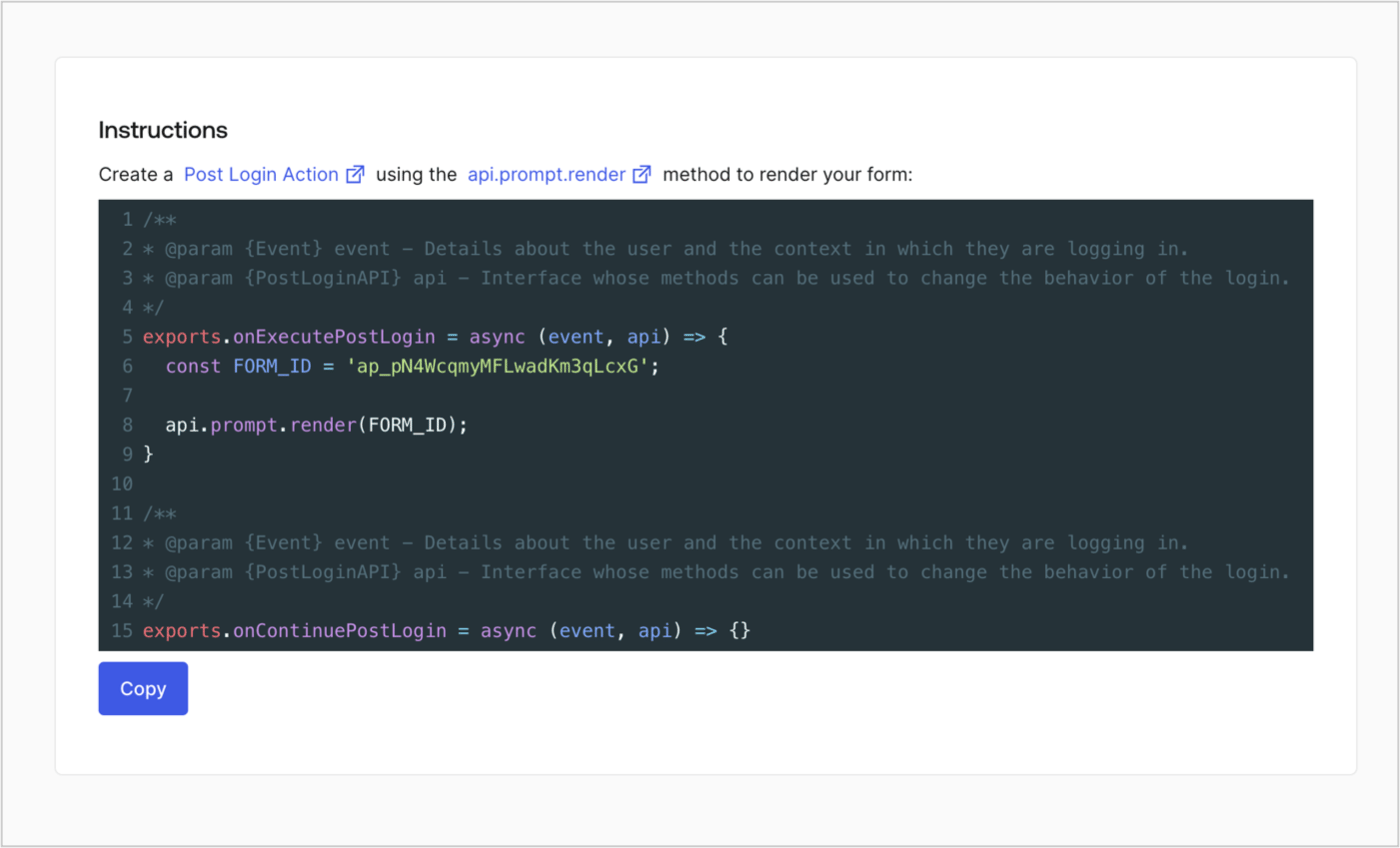
Retrieve your form render code to visually render the form with a custom Post Login Action by following these steps:

* From the Form editor, select **`<> Render`**.
* Select **Copy**.
<Frame>
  <img src="https://mintcdn.com/docs-staging-feat-docs-5612-expanded-grant-support-ea/xVUgBmlPWQs-srLo/docs/images/cdy7uua7fh8z/2EIUzc539sq9lwoTKbjoJv/496a864c0fc44a782c9cadca119dbfb0/embed.png?fit=max&auto=format&n=xVUgBmlPWQs-srLo&q=85&s=5037659d08fc41edb76d7cdeb1510c52" alt="Dashboard > Actions > Forms > Form > Embed" data-og-width="1400" width="1400" data-og-height="848" height="848" data-path="docs/images/cdy7uua7fh8z/2EIUzc539sq9lwoTKbjoJv/496a864c0fc44a782c9cadca119dbfb0/embed.png" data-optimize="true" data-opv="3" srcset="https://mintcdn.com/docs-staging-feat-docs-5612-expanded-grant-support-ea/xVUgBmlPWQs-srLo/docs/images/cdy7uua7fh8z/2EIUzc539sq9lwoTKbjoJv/496a864c0fc44a782c9cadca119dbfb0/embed.png?w=280&fit=max&auto=format&n=xVUgBmlPWQs-srLo&q=85&s=1595f488f456e25fba843b81cdd85454 280w, https://mintcdn.com/docs-staging-feat-docs-5612-expanded-grant-support-ea/xVUgBmlPWQs-srLo/docs/images/cdy7uua7fh8z/2EIUzc539sq9lwoTKbjoJv/496a864c0fc44a782c9cadca119dbfb0/embed.png?w=560&fit=max&auto=format&n=xVUgBmlPWQs-srLo&q=85&s=4c9a1a337f2ca4a53afe529c58d68b51 560w, https://mintcdn.com/docs-staging-feat-docs-5612-expanded-grant-support-ea/xVUgBmlPWQs-srLo/docs/images/cdy7uua7fh8z/2EIUzc539sq9lwoTKbjoJv/496a864c0fc44a782c9cadca119dbfb0/embed.png?w=840&fit=max&auto=format&n=xVUgBmlPWQs-srLo&q=85&s=05141dfee3e62eef65b87185798d84eb 840w, https://mintcdn.com/docs-staging-feat-docs-5612-expanded-grant-support-ea/xVUgBmlPWQs-srLo/docs/images/cdy7uua7fh8z/2EIUzc539sq9lwoTKbjoJv/496a864c0fc44a782c9cadca119dbfb0/embed.png?w=1100&fit=max&auto=format&n=xVUgBmlPWQs-srLo&q=85&s=2a9db7b05c66dd43f58ec4347da2840f 1100w, https://mintcdn.com/docs-staging-feat-docs-5612-expanded-grant-support-ea/xVUgBmlPWQs-srLo/docs/images/cdy7uua7fh8z/2EIUzc539sq9lwoTKbjoJv/496a864c0fc44a782c9cadca119dbfb0/embed.png?w=1650&fit=max&auto=format&n=xVUgBmlPWQs-srLo&q=85&s=25f560e65685545bec4b3c2e9a805fa9 1650w, https://mintcdn.com/docs-staging-feat-docs-5612-expanded-grant-support-ea/xVUgBmlPWQs-srLo/docs/images/cdy7uua7fh8z/2EIUzc539sq9lwoTKbjoJv/496a864c0fc44a782c9cadca119dbfb0/embed.png?w=2500&fit=max&auto=format&n=xVUgBmlPWQs-srLo&q=85&s=fe7b9396c6ff5c00adbe7bf5c8983d7f 2500w" />
</Frame>

## Create a Post Login Action

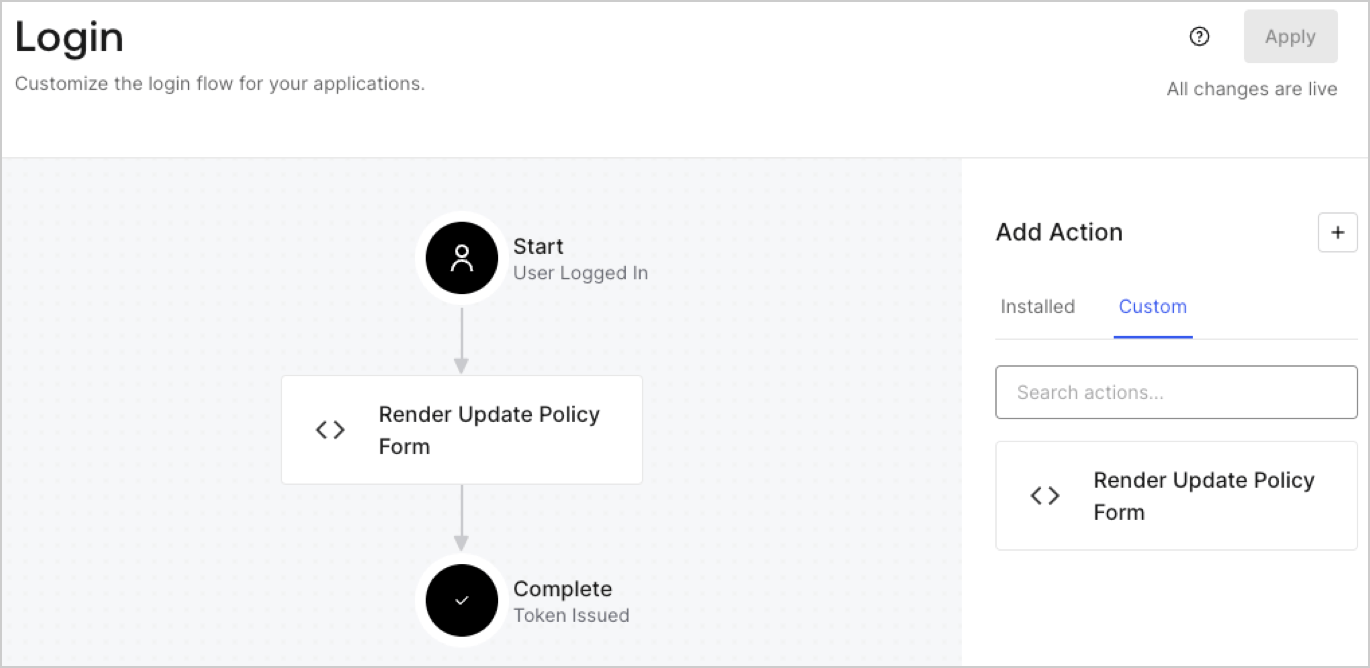
Create a post-login Action to render your form by following these steps:

1. Navigate to **Auth0 Dashboard > Actions > Flows > Login.**
2. Select the **+** icon and Select **Build from scratch**:

   * **Name**: Enter `Render Update Policy Form`.
   * **Trigger**: Select `Login / Post Login`.
   * **Runtime**: Select the recommended version.
3. Select **Create**.

To configure the post-login Action:

1. Delete the existing code from the Code editor.
2. Paste the form render code into the Code editor.
3. Edit the code to define the conditional logic that will render the form.

   ```javascript lines theme={null}
   /**
   * @param {Event} event - Details about the user and the context in which they are logging in.
   * @param {PostLoginAPI} api - Interface whose methods can be used to change the behavior of the login.
   */
   exports.onExecutePostLogin = async (event, api) => {
     const FORM_ID = 'REPLACE_WITH_YOUR_FORM_ID';

     if (event.user.app_metadata.privacy_policies !== true) {
       api.prompt.render(FORM_ID);
     }
   }

   exports.onContinuePostLogin = async (event, api) => { }
   ```

   <Callout icon="file-lines" color="#0EA5E9" iconType="regular">
     The example code above will render the form when a user is missing the app metadata `privacy_policies` property.
   </Callout>
4. Select **Deploy.**
5. Drag and Drop the **Render Update Policy Form** Action to the **Login** flow.
   <Frame>
     <img src="https://mintcdn.com/docs-staging-feat-docs-5612-expanded-grant-support-ea/kQnqKUYmOilrXlXE/docs/images/cdy7uua7fh8z/5TOwDgevZsBqd7yZynUYWU/41ca909dc3007aed4f40ff794a05efa5/postlogin.png?fit=max&auto=format&n=kQnqKUYmOilrXlXE&q=85&s=6e7d6dbeaed931c672548295e2d51ca5" alt="Dashboard > Forms > Use Case > Render update policy form login action" data-og-width="1370" width="1370" data-og-height="668" height="668" data-path="docs/images/cdy7uua7fh8z/5TOwDgevZsBqd7yZynUYWU/41ca909dc3007aed4f40ff794a05efa5/postlogin.png" data-optimize="true" data-opv="3" srcset="https://mintcdn.com/docs-staging-feat-docs-5612-expanded-grant-support-ea/kQnqKUYmOilrXlXE/docs/images/cdy7uua7fh8z/5TOwDgevZsBqd7yZynUYWU/41ca909dc3007aed4f40ff794a05efa5/postlogin.png?w=280&fit=max&auto=format&n=kQnqKUYmOilrXlXE&q=85&s=06ed61eb8ea3aae110cae7b3e01f955c 280w, https://mintcdn.com/docs-staging-feat-docs-5612-expanded-grant-support-ea/kQnqKUYmOilrXlXE/docs/images/cdy7uua7fh8z/5TOwDgevZsBqd7yZynUYWU/41ca909dc3007aed4f40ff794a05efa5/postlogin.png?w=560&fit=max&auto=format&n=kQnqKUYmOilrXlXE&q=85&s=68653ccf5f4528ce0756d4dc8a6799c3 560w, https://mintcdn.com/docs-staging-feat-docs-5612-expanded-grant-support-ea/kQnqKUYmOilrXlXE/docs/images/cdy7uua7fh8z/5TOwDgevZsBqd7yZynUYWU/41ca909dc3007aed4f40ff794a05efa5/postlogin.png?w=840&fit=max&auto=format&n=kQnqKUYmOilrXlXE&q=85&s=2ed530b1a09756ffe3386f365bb01c33 840w, https://mintcdn.com/docs-staging-feat-docs-5612-expanded-grant-support-ea/kQnqKUYmOilrXlXE/docs/images/cdy7uua7fh8z/5TOwDgevZsBqd7yZynUYWU/41ca909dc3007aed4f40ff794a05efa5/postlogin.png?w=1100&fit=max&auto=format&n=kQnqKUYmOilrXlXE&q=85&s=46aaed03abd99381f571f66738c963a5 1100w, https://mintcdn.com/docs-staging-feat-docs-5612-expanded-grant-support-ea/kQnqKUYmOilrXlXE/docs/images/cdy7uua7fh8z/5TOwDgevZsBqd7yZynUYWU/41ca909dc3007aed4f40ff794a05efa5/postlogin.png?w=1650&fit=max&auto=format&n=kQnqKUYmOilrXlXE&q=85&s=24e9acb93aa53d0456423cf3e8938dfb 1650w, https://mintcdn.com/docs-staging-feat-docs-5612-expanded-grant-support-ea/kQnqKUYmOilrXlXE/docs/images/cdy7uua7fh8z/5TOwDgevZsBqd7yZynUYWU/41ca909dc3007aed4f40ff794a05efa5/postlogin.png?w=2500&fit=max&auto=format&n=kQnqKUYmOilrXlXE&q=85&s=ab9fc8e65832e560f25e2f7fdebffc2e 2500w" />
   </Frame>
6. Select **Apply.**

### Test implementation

Test the implementation by following these steps:

1. Log in with an existing user whose app`_metadata` attribute `privacy_policies` does not have a value.
2. The post-login Action in the Login flow will render the form and prompt for acceptance.
3. Select **Auth0 Dashboard > User Management > Users,** locate the user and verify that the `app_metadata` attribute `privacy_policies` contains a `true` value and a timestamp.
