> ## Documentation Index
> Fetch the complete documentation index at: https://docs-staging-feat-docs-5612-expanded-grant-support-ea.mintlify.site/llms.txt
> Use this file to discover all available pages before exploring further.

> Learn how to configure your HTTP Vault Connections to authorize HTTP requests to external APIs or services.

# HTTP Vault Connection

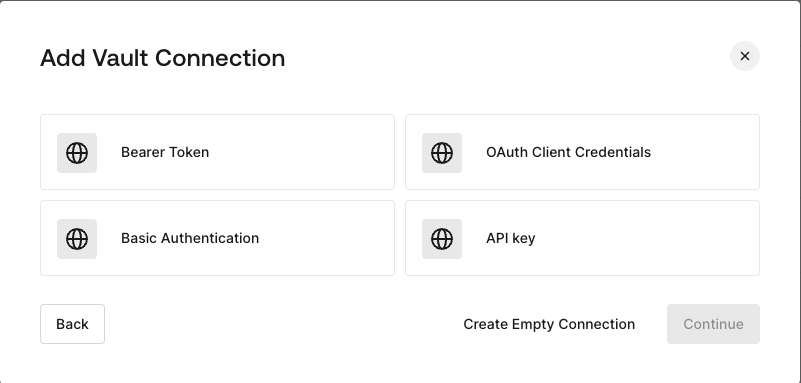
## Configure your HTTP Vault Connection Options

HTTP Vault Connection can be configure with different authentication options and then be used at your HTTP Request Flow Actions.
<Frame>
  <img src="https://mintcdn.com/docs-staging-feat-docs-5612-expanded-grant-support-ea/96dAG6L4N0cU8PsO/docs/images/customize/forms/vaults/http-vault-connection-options.png?fit=max&auto=format&n=96dAG6L4N0cU8PsO&q=85&s=c9dbf9c99a89871a9a396cb1d9ea1127" alt="Dashboard > Actions > Forms > Vault > HTTP" data-og-width="801" width="801" data-og-height="383" height="383" data-path="docs/images/customize/forms/vaults/http-vault-connection-options.png" data-optimize="true" data-opv="3" srcset="https://mintcdn.com/docs-staging-feat-docs-5612-expanded-grant-support-ea/96dAG6L4N0cU8PsO/docs/images/customize/forms/vaults/http-vault-connection-options.png?w=280&fit=max&auto=format&n=96dAG6L4N0cU8PsO&q=85&s=97cefdb732c86b47edcac5f4e32ef401 280w, https://mintcdn.com/docs-staging-feat-docs-5612-expanded-grant-support-ea/96dAG6L4N0cU8PsO/docs/images/customize/forms/vaults/http-vault-connection-options.png?w=560&fit=max&auto=format&n=96dAG6L4N0cU8PsO&q=85&s=019e5b324b8c701b156ab5b2d61d7bce 560w, https://mintcdn.com/docs-staging-feat-docs-5612-expanded-grant-support-ea/96dAG6L4N0cU8PsO/docs/images/customize/forms/vaults/http-vault-connection-options.png?w=840&fit=max&auto=format&n=96dAG6L4N0cU8PsO&q=85&s=6283c3d8caab73e2c2c3c4a8b778ad74 840w, https://mintcdn.com/docs-staging-feat-docs-5612-expanded-grant-support-ea/96dAG6L4N0cU8PsO/docs/images/customize/forms/vaults/http-vault-connection-options.png?w=1100&fit=max&auto=format&n=96dAG6L4N0cU8PsO&q=85&s=ec0aa53908a4321707597c69f16bcb54 1100w, https://mintcdn.com/docs-staging-feat-docs-5612-expanded-grant-support-ea/96dAG6L4N0cU8PsO/docs/images/customize/forms/vaults/http-vault-connection-options.png?w=1650&fit=max&auto=format&n=96dAG6L4N0cU8PsO&q=85&s=7c10d209b69f44a89639da0aa4ae0380 1650w, https://mintcdn.com/docs-staging-feat-docs-5612-expanded-grant-support-ea/96dAG6L4N0cU8PsO/docs/images/customize/forms/vaults/http-vault-connection-options.png?w=2500&fit=max&auto=format&n=96dAG6L4N0cU8PsO&q=85&s=7dde4bba9bfb0965a243422101013f7f 2500w" />
</Frame>

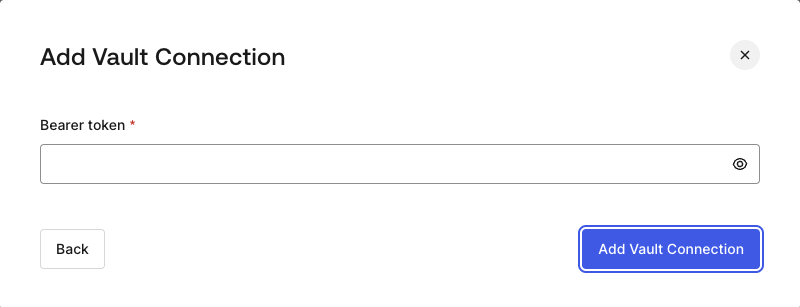
## Configure your HTTP Vault Connection for Bearer Token

To configure a HTTP Vault Connection using **Bearer Token** authorization, you need to set the required parameters.
<Frame>
  <img src="https://mintcdn.com/docs-staging-feat-docs-5612-expanded-grant-support-ea/96dAG6L4N0cU8PsO/docs/images/customize/forms/vaults/http-vault-connection-bearer-token.png?fit=max&auto=format&n=96dAG6L4N0cU8PsO&q=85&s=dc6d5e27503034b0504a39898f604b3a" alt="Dashboard > Actions > Forms > Vault > HTTP" data-og-width="800" width="800" data-og-height="307" height="307" data-path="docs/images/customize/forms/vaults/http-vault-connection-bearer-token.png" data-optimize="true" data-opv="3" srcset="https://mintcdn.com/docs-staging-feat-docs-5612-expanded-grant-support-ea/96dAG6L4N0cU8PsO/docs/images/customize/forms/vaults/http-vault-connection-bearer-token.png?w=280&fit=max&auto=format&n=96dAG6L4N0cU8PsO&q=85&s=8498571096d13ce0cf8cf9209a94a192 280w, https://mintcdn.com/docs-staging-feat-docs-5612-expanded-grant-support-ea/96dAG6L4N0cU8PsO/docs/images/customize/forms/vaults/http-vault-connection-bearer-token.png?w=560&fit=max&auto=format&n=96dAG6L4N0cU8PsO&q=85&s=d9026f1779f7b3eb7a6d84e40bdd4f89 560w, https://mintcdn.com/docs-staging-feat-docs-5612-expanded-grant-support-ea/96dAG6L4N0cU8PsO/docs/images/customize/forms/vaults/http-vault-connection-bearer-token.png?w=840&fit=max&auto=format&n=96dAG6L4N0cU8PsO&q=85&s=52966c2de8b4fc0fd756254cfb99d657 840w, https://mintcdn.com/docs-staging-feat-docs-5612-expanded-grant-support-ea/96dAG6L4N0cU8PsO/docs/images/customize/forms/vaults/http-vault-connection-bearer-token.png?w=1100&fit=max&auto=format&n=96dAG6L4N0cU8PsO&q=85&s=596c45dba2ca79af924e203743608b1c 1100w, https://mintcdn.com/docs-staging-feat-docs-5612-expanded-grant-support-ea/96dAG6L4N0cU8PsO/docs/images/customize/forms/vaults/http-vault-connection-bearer-token.png?w=1650&fit=max&auto=format&n=96dAG6L4N0cU8PsO&q=85&s=dec1e077e70304f43e0de72ff1a34aa4 1650w, https://mintcdn.com/docs-staging-feat-docs-5612-expanded-grant-support-ea/96dAG6L4N0cU8PsO/docs/images/customize/forms/vaults/http-vault-connection-bearer-token.png?w=2500&fit=max&auto=format&n=96dAG6L4N0cU8PsO&q=85&s=15c6ee80ac7275d2200e84c4453a0e57 2500w" />
</Frame>

### Input settings

| Parameter    | Description                                           |
| ------------ | ----------------------------------------------------- |
| Bearer Token | Static token used for external service authorization. |

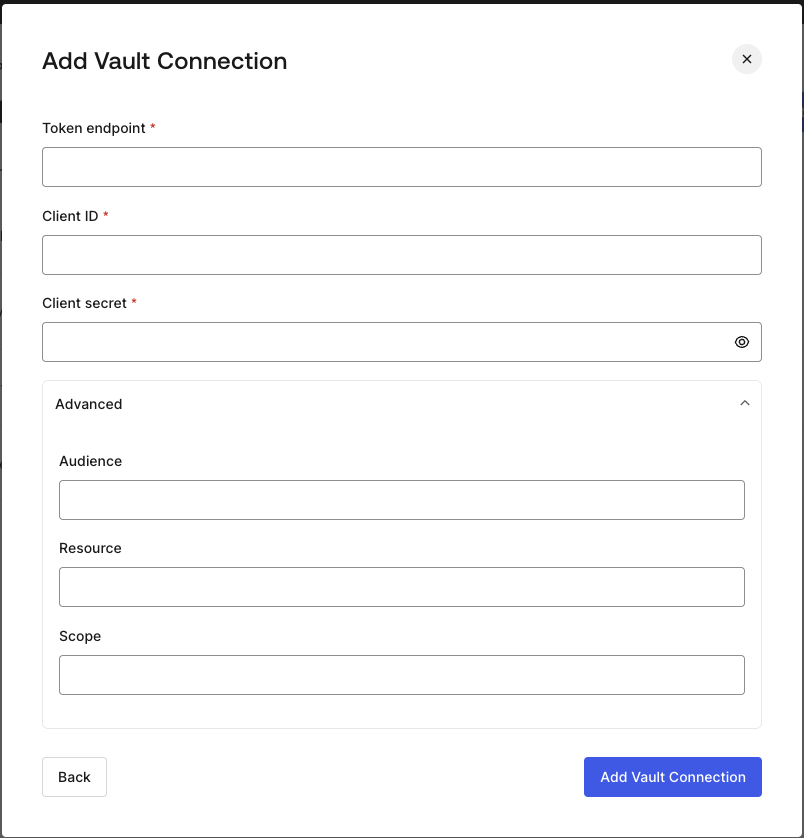
## Configure your HTTP Vault Connection for OAuth Client Credentials

To configure a HTTP Vault Connection using **Client Credentials** authorization, you need to set the required parameters.
<Frame>
  <img src="https://mintcdn.com/docs-staging-feat-docs-5612-expanded-grant-support-ea/96dAG6L4N0cU8PsO/docs/images/customize/forms/vaults/http-vault-connection-oauth-client-credentials.png?fit=max&auto=format&n=96dAG6L4N0cU8PsO&q=85&s=963f6b900fd2e3c02cbf8335f80045c3" alt="Dashboard > Actions > Forms > Vault > HTTP " data-og-width="804" width="804" data-og-height="838" height="838" data-path="docs/images/customize/forms/vaults/http-vault-connection-oauth-client-credentials.png" data-optimize="true" data-opv="3" srcset="https://mintcdn.com/docs-staging-feat-docs-5612-expanded-grant-support-ea/96dAG6L4N0cU8PsO/docs/images/customize/forms/vaults/http-vault-connection-oauth-client-credentials.png?w=280&fit=max&auto=format&n=96dAG6L4N0cU8PsO&q=85&s=aa8506b626e04ccf199039c657956a07 280w, https://mintcdn.com/docs-staging-feat-docs-5612-expanded-grant-support-ea/96dAG6L4N0cU8PsO/docs/images/customize/forms/vaults/http-vault-connection-oauth-client-credentials.png?w=560&fit=max&auto=format&n=96dAG6L4N0cU8PsO&q=85&s=4e72761e1a3418ea261fdbed0c17d9f1 560w, https://mintcdn.com/docs-staging-feat-docs-5612-expanded-grant-support-ea/96dAG6L4N0cU8PsO/docs/images/customize/forms/vaults/http-vault-connection-oauth-client-credentials.png?w=840&fit=max&auto=format&n=96dAG6L4N0cU8PsO&q=85&s=143b10349b9c7844d712826127c54139 840w, https://mintcdn.com/docs-staging-feat-docs-5612-expanded-grant-support-ea/96dAG6L4N0cU8PsO/docs/images/customize/forms/vaults/http-vault-connection-oauth-client-credentials.png?w=1100&fit=max&auto=format&n=96dAG6L4N0cU8PsO&q=85&s=a494d8e4f69556eb752bbb49327cf63a 1100w, https://mintcdn.com/docs-staging-feat-docs-5612-expanded-grant-support-ea/96dAG6L4N0cU8PsO/docs/images/customize/forms/vaults/http-vault-connection-oauth-client-credentials.png?w=1650&fit=max&auto=format&n=96dAG6L4N0cU8PsO&q=85&s=483984a948fed957254e8e03961f0f85 1650w, https://mintcdn.com/docs-staging-feat-docs-5612-expanded-grant-support-ea/96dAG6L4N0cU8PsO/docs/images/customize/forms/vaults/http-vault-connection-oauth-client-credentials.png?w=2500&fit=max&auto=format&n=96dAG6L4N0cU8PsO&q=85&s=510dfa0b6db30d29af35690c32aa02f9 2500w" />
</Frame>

### Input settings

| Parameter           | Description                                                               |
| ------------------- | ------------------------------------------------------------------------- |
| Tenant Endpoint     | Tenant Endpoint of the Authorization Server issuing the Access Tokens.    |
| Client ID           | Client ID of your M2M Application authorized for Custom API.              |
| Client Secret       | Client Secret of your M2M Application authorized for Custom API.          |
| Audience (Optional) | Custom API Audience. Normally used for Custom APIs defined in Auth0.      |
| Resource (Optional) | Custom API Resource. Standard parameter with similar meaning of Audience. |
| Scope (Optional)    | Scope list in string format separated by spaces.                          |

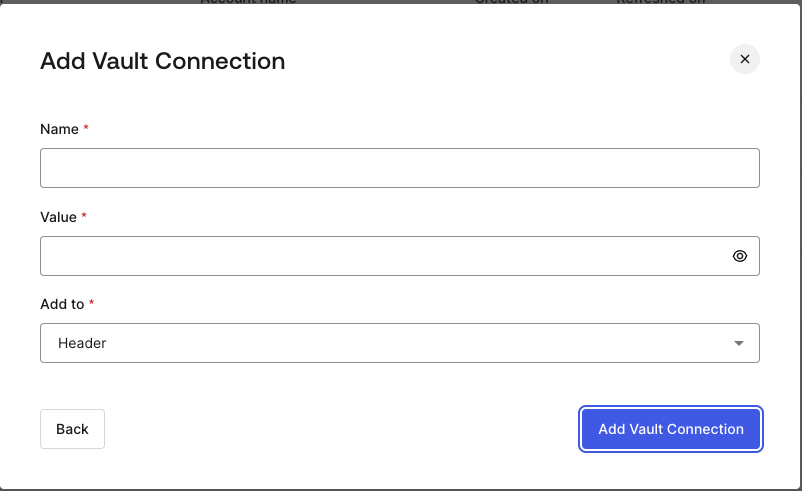
## Configure your HTTP Vault Connection for API Key

To configure a HTTP Vault Connection using **API Key** authorization, you need to set the required parameters.
<Frame>
  <img src="https://mintcdn.com/docs-staging-feat-docs-5612-expanded-grant-support-ea/96dAG6L4N0cU8PsO/docs/images/customize/forms/vaults/http-vault-connection-api-key.png?fit=max&auto=format&n=96dAG6L4N0cU8PsO&q=85&s=12e42f885a8b7aeea546224d12c9618c" alt="Dashboard > Actions > Forms > Vault > HTTP " data-og-width="802" width="802" data-og-height="491" height="491" data-path="docs/images/customize/forms/vaults/http-vault-connection-api-key.png" data-optimize="true" data-opv="3" srcset="https://mintcdn.com/docs-staging-feat-docs-5612-expanded-grant-support-ea/96dAG6L4N0cU8PsO/docs/images/customize/forms/vaults/http-vault-connection-api-key.png?w=280&fit=max&auto=format&n=96dAG6L4N0cU8PsO&q=85&s=d2de9258f4baacafc6da6117fb603a01 280w, https://mintcdn.com/docs-staging-feat-docs-5612-expanded-grant-support-ea/96dAG6L4N0cU8PsO/docs/images/customize/forms/vaults/http-vault-connection-api-key.png?w=560&fit=max&auto=format&n=96dAG6L4N0cU8PsO&q=85&s=2fe261f27421678f602982af83b7b95c 560w, https://mintcdn.com/docs-staging-feat-docs-5612-expanded-grant-support-ea/96dAG6L4N0cU8PsO/docs/images/customize/forms/vaults/http-vault-connection-api-key.png?w=840&fit=max&auto=format&n=96dAG6L4N0cU8PsO&q=85&s=4a69e281e2cbad20bd012f11e430bcd4 840w, https://mintcdn.com/docs-staging-feat-docs-5612-expanded-grant-support-ea/96dAG6L4N0cU8PsO/docs/images/customize/forms/vaults/http-vault-connection-api-key.png?w=1100&fit=max&auto=format&n=96dAG6L4N0cU8PsO&q=85&s=2404ba999d27021d19f47dda9a468a36 1100w, https://mintcdn.com/docs-staging-feat-docs-5612-expanded-grant-support-ea/96dAG6L4N0cU8PsO/docs/images/customize/forms/vaults/http-vault-connection-api-key.png?w=1650&fit=max&auto=format&n=96dAG6L4N0cU8PsO&q=85&s=a3958d18cb882852398e1c0f9c6f69aa 1650w, https://mintcdn.com/docs-staging-feat-docs-5612-expanded-grant-support-ea/96dAG6L4N0cU8PsO/docs/images/customize/forms/vaults/http-vault-connection-api-key.png?w=2500&fit=max&auto=format&n=96dAG6L4N0cU8PsO&q=85&s=7fcd703e2cbc826ca20c2f9c5e6ad0ff 2500w" />
</Frame>

### Input settings

| Parameter | Description                                                                                  |
| --------- | -------------------------------------------------------------------------------------------- |
| Name      | API Key name to be added as Header or Query parameter.                                       |
| Value     | API Key value to be added as Header or Query parameter.                                      |
| Add To    | By default, it's Header. Determines whether to add the API Key as Header or Query parameter. |

## Configure your HTTP Vault Connection for Basic Authentication

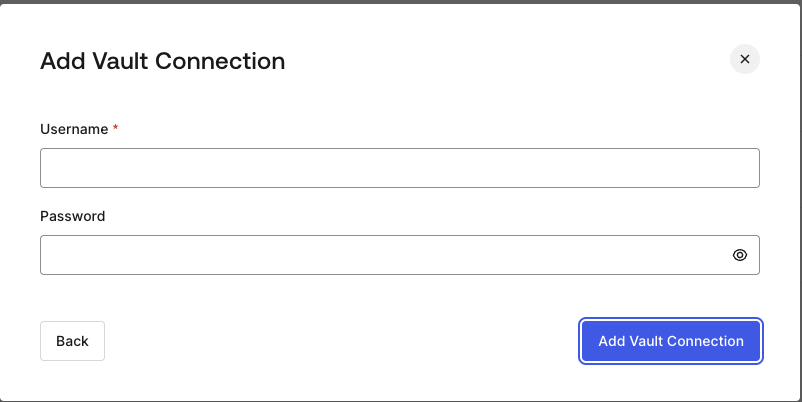
To configure a HTTP Vault Connection using **Basic Auth** authorization, you need to set the required parameters.
<Frame>
  <img src="https://mintcdn.com/docs-staging-feat-docs-5612-expanded-grant-support-ea/96dAG6L4N0cU8PsO/docs/images/customize/forms/vaults/http-vault-connection-basic-authentication.png?fit=max&auto=format&n=96dAG6L4N0cU8PsO&q=85&s=fce0d3f86d17ae566c06da58dd504f06" alt="Dashboard > Actions > Forms > Vault > HTTP " data-og-width="802" width="802" data-og-height="402" height="402" data-path="docs/images/customize/forms/vaults/http-vault-connection-basic-authentication.png" data-optimize="true" data-opv="3" srcset="https://mintcdn.com/docs-staging-feat-docs-5612-expanded-grant-support-ea/96dAG6L4N0cU8PsO/docs/images/customize/forms/vaults/http-vault-connection-basic-authentication.png?w=280&fit=max&auto=format&n=96dAG6L4N0cU8PsO&q=85&s=999a5208ea9cdfb4a7cb531a3e71aaae 280w, https://mintcdn.com/docs-staging-feat-docs-5612-expanded-grant-support-ea/96dAG6L4N0cU8PsO/docs/images/customize/forms/vaults/http-vault-connection-basic-authentication.png?w=560&fit=max&auto=format&n=96dAG6L4N0cU8PsO&q=85&s=5ce3b37d0948608347dee7cfd91953ff 560w, https://mintcdn.com/docs-staging-feat-docs-5612-expanded-grant-support-ea/96dAG6L4N0cU8PsO/docs/images/customize/forms/vaults/http-vault-connection-basic-authentication.png?w=840&fit=max&auto=format&n=96dAG6L4N0cU8PsO&q=85&s=e4f5719b5e6d06ffc865209294ceec97 840w, https://mintcdn.com/docs-staging-feat-docs-5612-expanded-grant-support-ea/96dAG6L4N0cU8PsO/docs/images/customize/forms/vaults/http-vault-connection-basic-authentication.png?w=1100&fit=max&auto=format&n=96dAG6L4N0cU8PsO&q=85&s=fb0bfe9c296d34077216133e318f9542 1100w, https://mintcdn.com/docs-staging-feat-docs-5612-expanded-grant-support-ea/96dAG6L4N0cU8PsO/docs/images/customize/forms/vaults/http-vault-connection-basic-authentication.png?w=1650&fit=max&auto=format&n=96dAG6L4N0cU8PsO&q=85&s=8a008f7099ac7bb608aa0d69c3c488d8 1650w, https://mintcdn.com/docs-staging-feat-docs-5612-expanded-grant-support-ea/96dAG6L4N0cU8PsO/docs/images/customize/forms/vaults/http-vault-connection-basic-authentication.png?w=2500&fit=max&auto=format&n=96dAG6L4N0cU8PsO&q=85&s=4ab124903c3beaf367d801fb607857d4 2500w" />
</Frame>

### Input settings

| Parameter | Description                                                                                         |
| --------- | --------------------------------------------------------------------------------------------------- |
| Username  | Username to be concatenated and base64 encoded, then added as Basic Authorization Header parameter. |
| Password  | Password to be concatenated and base64 encoded, then added as Basic Authorization Header parameter. |

<Warning>
  HTTP Vault Connection with Basic Auth configuration, is looking forward to replace the currently built-in option at Flows HTTP Request Action.
</Warning>
