> ## Documentation Index
> Fetch the complete documentation index at: https://docs-staging-feat-docs-5612-expanded-grant-support-ea.mintlify.site/llms.txt
> Use this file to discover all available pages before exploring further.
> Découvrez comment renforcer la sécurité et réduire les risques d’usurpation d’application grâce aux URI de rappel sur HTTPS.
# Migrer vers la confirmation de l’utilisateur final pour les URI de rappel non vérifiables
Auth0 recommande à toutes les applications natives qui utilisent le [Flux de code d’autorisation](/docs/fr-ca/get-started/authentication-and-authorization-flow/authorization-code-flow-with-pkce) de passer aux URI de rappel sur HTTPS à l’aide de [Android App Links](https://developer.android.com/training/app-links) et des [Apple Universal Links](https://developer.apple.com/documentation/xcode/allowing-apps-and-websites-to-link-to-your-content). Cela renforce la sécurité et réduit les risques d’usurpation d’application et d’attaques d’hameçonnage.
Pour comprendre comment cela permet de prévenir ces attaques, consultez les [Mesures contre l’usurpation d’application](/docs/fr-ca/secure/security-guidance/measures-against-app-impersonation#prompt-customization).
Les tenants créés avant le 15 octobre 2025 conservent le comportement précédent par défaut jusqu’au 28 avril 2026. Après l’échéance d’octobre, les tenants nouvellement créés peuvent, par défaut, afficher la nouvelle invite de confirmation de connexion, avec quelques exceptions selon le calendrier de déploiement propre à chaque environnement.
Les tenants qui choisissent explicitement de s’en exclure contourneront cette invite indéfiniment. Cela demeure vrai même après le 28 avril 2026, lorsque le service adoptera l’invite de confirmation comme comportement par défaut et supprimera la bascule de migration « Unconfirmed Login with Non-Verifiable Callback URI Redirects ».
Quelles sont les répercussions pour vous?
Pour les applications clientes qui précisent déjà ou prévoient préciser un schéma d’URI personnalisé ou une URI de rappel loopback, il se peut que les utilisateurs finaux doivent confirmer explicitement la connexion en répondant à la nouvelle invite de confirmation de connexion. Vos utilisateurs finaux pourraient percevoir ce changement comme une détérioration de l’expérience utilisateur.
De plus, les requêtes d’authentification comprenant `prompt=none` seront rejetées lorsque les applications utilisent des URI de rappel non vérifiables et sont configurées pour utiliser la nouvelle invite de confirmation de connexion.
Tâches de migration
**Auth0 recommande fortement de passer à des URI de rappel sur HTTPS** en utilisant Android App Links et Apple Universal Links chaque fois que possible pour toutes les applications natives qui utilisent le flux de code d’autorisation.
De plus, dans les tenants où le comportement par défaut changera après le 28 avril 2026, vous devriez sélectionner explicitement le comportement requis pour les requêtes d’authentification utilisant des schémas d’URI personnalisés ou des URI de rappel loopback avant le changement du comportement par défaut du système.
Vérifiez si vos applications utilisent des URI de rappel non vérifiables
Pour les tenants où la bascule de migration Unconfirmed Login with Non-Verifiable Callback URI Redirects est disponible et activée, les requêtes d’authentification qui précisent un schéma d’URI personnalisé ou une URI de rappel loopback **généreront une entrée de journal du tenant avec un avis de dépréciation**, à moins que vous n’ayez explicitement défini l’option suivante au niveau de l’application ou du tenant :
`skip_non_verifiable_callback_uri_confirmation_prompt`
Ces journaux du tenant contiennent l’identifiant client de l’application qui effectue la requête. Vous pouvez surveiller ces journaux du tenant dans l’Auth0 Dashboard à l’aide de la requête suivante :
```bash theme={null}
type:depnotetype:depnote AND description:Unconfirmed\ Login\ with\ Non-Verifiable\ Callback\ URI\ Redirects*
```
Activer la nouvelle invite de confirmation de connexion
Pour activer à l’avance la nouvelle invite de confirmation de connexion et renforcer la sécurité des flux d’authentification qui utilisent des schémas d’URI personnalisés ou des URI de rappel loopback, suivez les étapes ci-dessous dans votre Auth0 Dashboard :
1. Accédez à [**Auth0 Dashboard > Paramètres du tenant > Avancé**](https://manage.auth0.com/#/tenant/advanced).
2. Dans la section **Migrations**, désactivez la bascule **Unconfirmed Login with Non-Verifiable Callback URI Redirects**.
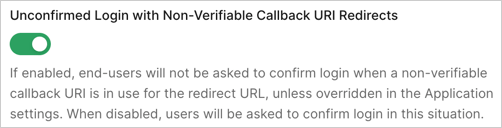
Désactiver la nouvelle invite de confirmation de connexion
Si, après avoir évalué les considérations de sécurité, vous décidez de ne pas utiliser la nouvelle invite de confirmation de connexion, vous pouvez configurer des applications précises ou l’ensemble du tenant pour ne pas utiliser ce nouveau comportement. Vous pouvez le faire dans votre Auth0 Dashboard.
Le paramètre au niveau de l’application a préséance sur le paramètre au niveau du tenant. Assurez-vous de configurer les paramètres propres à l’application avant de modifier le paramètre au niveau du tenant afin d’éviter des changements de comportement involontaires. Par exemple, vous pourriez vouloir ignorer la fonctionnalité **Non-Verifiable Callback URI End-User Confirmation** pour certaines applications précises tout en l’affichant, par défaut, pour d’autres applications, ou inversement.
Pour désactiver cette fonctionnalité pour des applications précises :
1. Accédez à [Auth0 Dashboard > Applications > Paramètres > Paramètres avancés > OAuth](https://manage.auth0.com/applications/settings).
2. Repérez et désactivez la bascule **Non-Verifiable Callback URI End-User Confirmation**, puis sélectionnez **Enregistrer**. Vous devrez peut-être sélectionner l’option **Override the tenant setting** pour autoriser la gestion permanente de cette configuration.
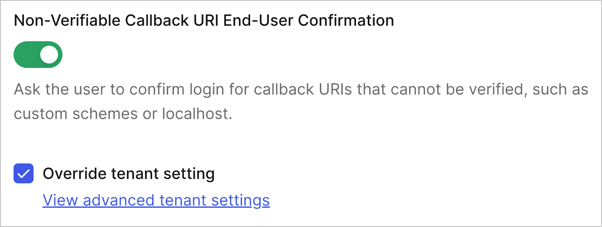 Pour désactiver cette fonctionnalité pour l’ensemble du tenant :
1. Accédez à [Auth0 Dashboard > Paramètres du tenant > Avancé](https://manage.auth0.com/tenant/advanced).
2. Repérez et désactivez la bascule **Non-Verifiable Callback URI End-User Confirmation** dans la section **Connexion et déconnexion**, puis sélectionnez **Enregistrer**. Vous devrez peut-être sélectionner **Turn on** pour autoriser la gestion permanente de cette configuration.
Pour désactiver cette fonctionnalité pour l’ensemble du tenant :
1. Accédez à [Auth0 Dashboard > Paramètres du tenant > Avancé](https://manage.auth0.com/tenant/advanced).
2. Repérez et désactivez la bascule **Non-Verifiable Callback URI End-User Confirmation** dans la section **Connexion et déconnexion**, puis sélectionnez **Enregistrer**. Vous devrez peut-être sélectionner **Turn on** pour autoriser la gestion permanente de cette configuration.
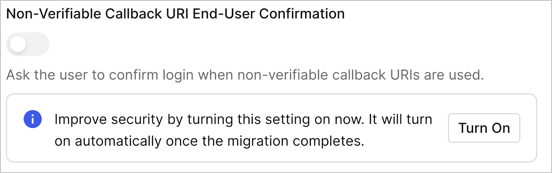 Vous pouvez aussi configurer le comportement requis du tenant au moyen de l’Auth0 Management API. Plus précisément, vous pouvez effectuer la configuration à deux niveaux :
* **Configuration au niveau du tenant** : Vous pouvez gérer le comportement de l’invite de confirmation en définissant la propriété `skip_non_verifiable_callback_uri_confirmation_prompt` au moyen du point de terminaison [Update Tenant Settings](https://auth0.com/docs/api/management/v2#!/Tenants/patch_settings).
* **Configuration au niveau de l’application** : Pour remplacer le paramètre au niveau du tenant pour des applications précises, définissez la même propriété `skip_non_verifiable_callback_uri_confirmation_prompt` au moyen du point de terminaison [Update Client](https://auth0.com/docs/api/management/v2#!/Clients/patch_clients_by_id).
Pour obtenir plus d’information et des conseils sur la configuration de vos applications, consultez [Measures Against Application Impersonation](/docs/fr-ca/secure/security-guidance/measures-against-app-impersonation).
Vous pouvez aussi configurer le comportement requis du tenant au moyen de l’Auth0 Management API. Plus précisément, vous pouvez effectuer la configuration à deux niveaux :
* **Configuration au niveau du tenant** : Vous pouvez gérer le comportement de l’invite de confirmation en définissant la propriété `skip_non_verifiable_callback_uri_confirmation_prompt` au moyen du point de terminaison [Update Tenant Settings](https://auth0.com/docs/api/management/v2#!/Tenants/patch_settings).
* **Configuration au niveau de l’application** : Pour remplacer le paramètre au niveau du tenant pour des applications précises, définissez la même propriété `skip_non_verifiable_callback_uri_confirmation_prompt` au moyen du point de terminaison [Update Client](https://auth0.com/docs/api/management/v2#!/Clients/patch_clients_by_id).
Pour obtenir plus d’information et des conseils sur la configuration de vos applications, consultez [Measures Against Application Impersonation](/docs/fr-ca/secure/security-guidance/measures-against-app-impersonation).